Definition
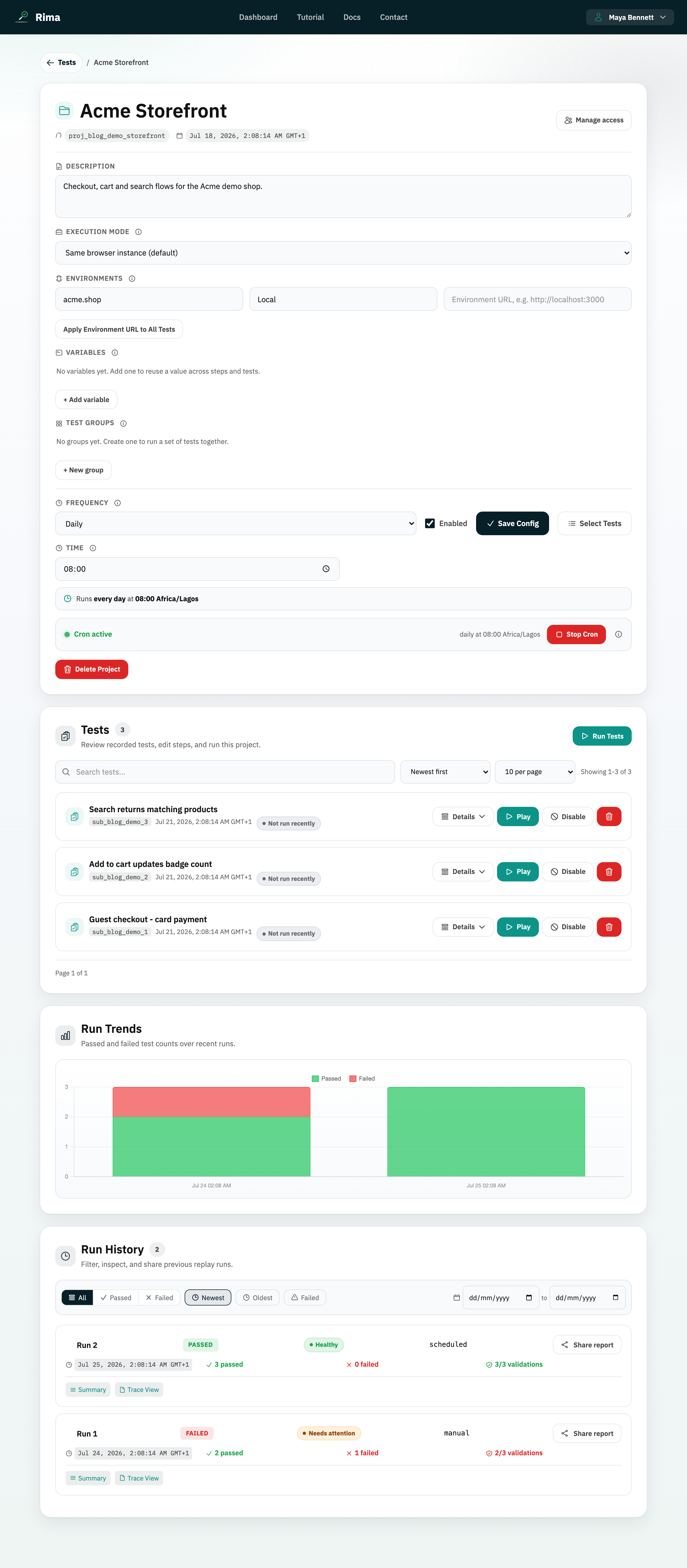
Project settings are the housekeeping controls on the project detail page: the inline name editor, the description field, the Save Config button, and the Delete Project action.
What it is for
Use these controls to keep a project clearly named and described, to persist configuration changes, and to remove a project you no longer need.
How it works
- Click the project name in the header to rename it inline: type the new name, press Enter or click away to save, or press Escape to cancel.
- The Description textarea stores a free-text summary of what the project covers; it saves with Save Config.
- Save Config writes every changed setting at once: description, execution mode, environments, and schedule.
- Delete Project asks for confirmation, then permanently removes the project with its recordings, tests, and run history.
Example
A team renames “Untitled project” to “Checkout regression”, adds the description “Covers cart, payment, and order confirmation”, and clicks Save Config; months later they delete a retired prototype project after exporting it.
Common use cases
- Rename a project so teammates recognize it.
- Document a project’s scope in its description.
- Save execution-mode, environment, and schedule changes in one click.
- Remove an obsolete project.
Where to find it
On the project detail page: the editable name sits in the header, the description and Save Config in the settings area, and Delete Project among the project actions.
Limitations, requirements, and permissions
- Each control is permission-gated: renaming needs rename-project permission, the description needs edit-description permission, and deletion needs delete-project permission.
- Save Config is hidden when you lack every relevant edit permission.
- Names cannot be empty, and the server rejects duplicates and invalid names.
- Deleting a project cannot be undone from the interface; export first if you may need it again.
Related features and guides
Ready to try it yourself?
Create your free account, record your first flow, add a validation, and let Rima run it on a schedule for you.
Start free trial