Definition
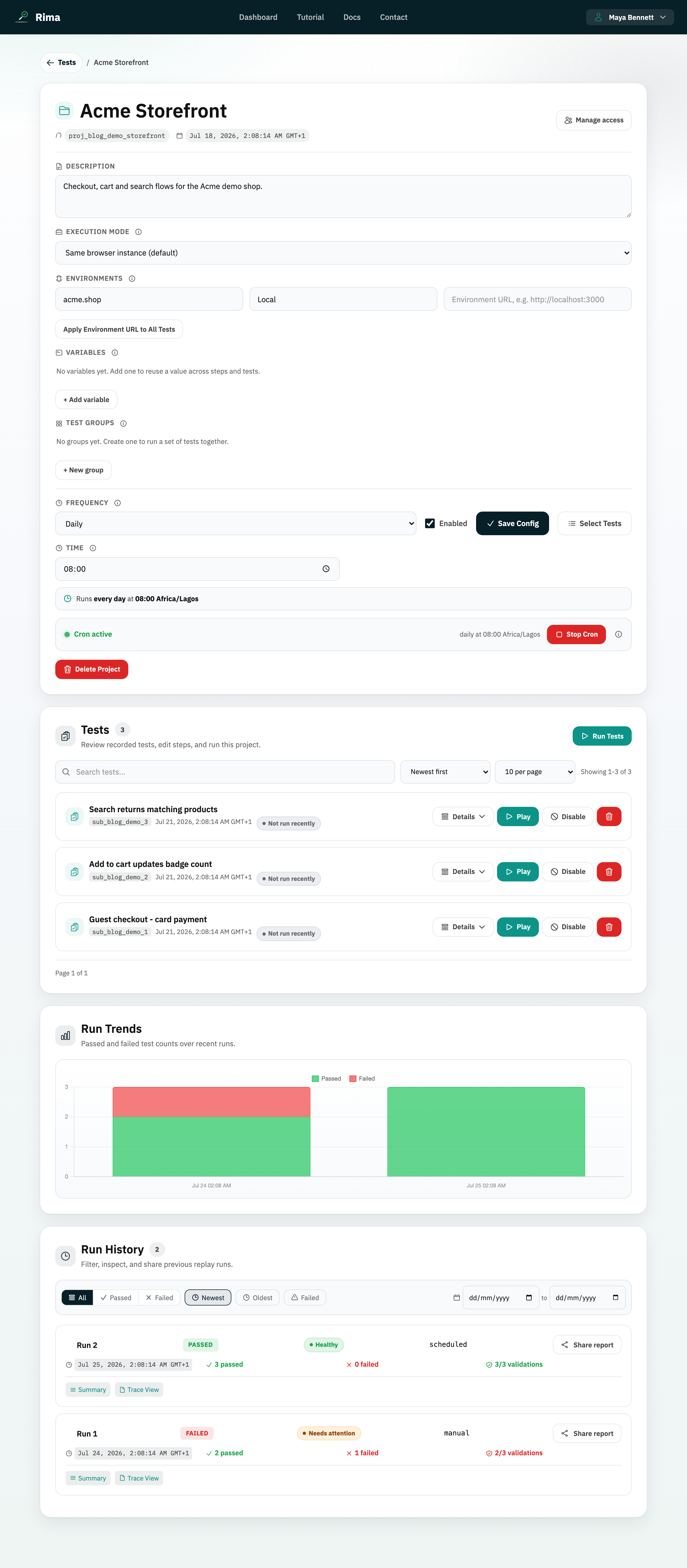
A schedule automatically starts selected tests or a test group at a recurring time.
What it is for
Scheduled runs detect regressions without waiting for someone to click Run.
How it works
- Pick a frequency: daily, weekly (choose the weekday), or monthly (choose the day of month). Then pick a time and timezone.
- Select the tests or a saved group to run, with optional order and run-before dependencies, then save the schedule.
- Press Start Cron to activate it; Rima starts the run automatically at each scheduled time and can email the results.
- Stop Cron pauses the schedule without deleting its configuration.
Example
Run the “Release smoke test” group every weekday at 08:00 in the workspace timezone and email the result.
Common use cases
- Daily production checks.
- Weekly regression runs.
- Monthly account audits.
- Automatic monitoring of a critical journey.
Where to find it
Open a project, configure frequency, time, timezone, and selected tests, save, then press Start.
Limitations, requirements, and permissions
- Scheduling requires schedule-management permission and an eligible plan.
- Only enabled tests can be scheduled; at least one test or a saved group is required.
- Monthly schedules skip months that do not contain the selected day (for example the 31st).
Related features and guides
Ready to try it yourself?
Create your free account, record your first flow, add a validation, and let Rima run it on a schedule for you.
Start free trial