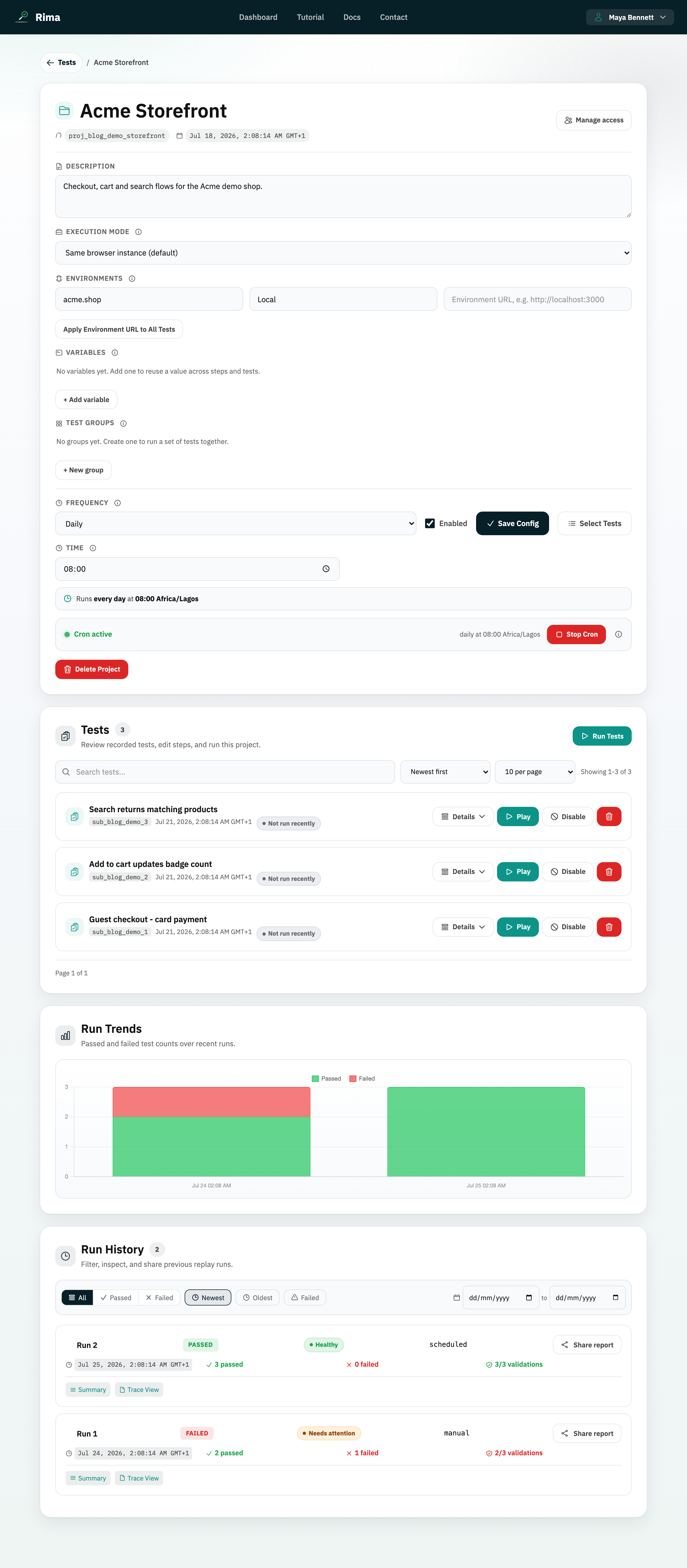
Definition
A project is a collection of tests, variables, environments, schedules, groups, access rules, and run history for one website or application.
What it is for
Projects keep related tests and their configuration together. A project is usually scoped to one product, site, or service.
How it works
- A project holds everything Rima needs to test one application: its tests, variables, groups, schedule, environment URLs, run history, and per-member access rules.
- Create a project from the dashboard or Projects page, record tests into it with the extension, then configure it on the project detail page.
- The dashboard panel and the Projects page let you search, filter, sort, paginate, import, and export projects.
- Per-project access controls which workspace members can see or manage each project.
Example
A project named “Storefront” can contain registration, login, product-search, checkout, and order-history tests for the same ecommerce site.
Common use cases
- Organize tests by application.
- Give selected teammates access to one application.
- Apply one environment URL to many tests.
- Schedule a group of related tests.
Where to find it
Create a project from the dashboard or Projects page, then open its card to configure it and manage its tests.
Limitations, requirements, and permissions
- Creating projects requires create-project permission and an active plan or trial; plan project limits are enforced by the server.
- You only see projects you have been granted access to.
- On the Free plan only one project stays active for runs at a time.
- Deleting a project removes its tests and run history and cannot be undone from the interface.
Related features and guides
Ready to try it yourself?
Create your free account, record your first flow, add a validation, and let Rima run it on a schedule for you.
Start free trial