Definition
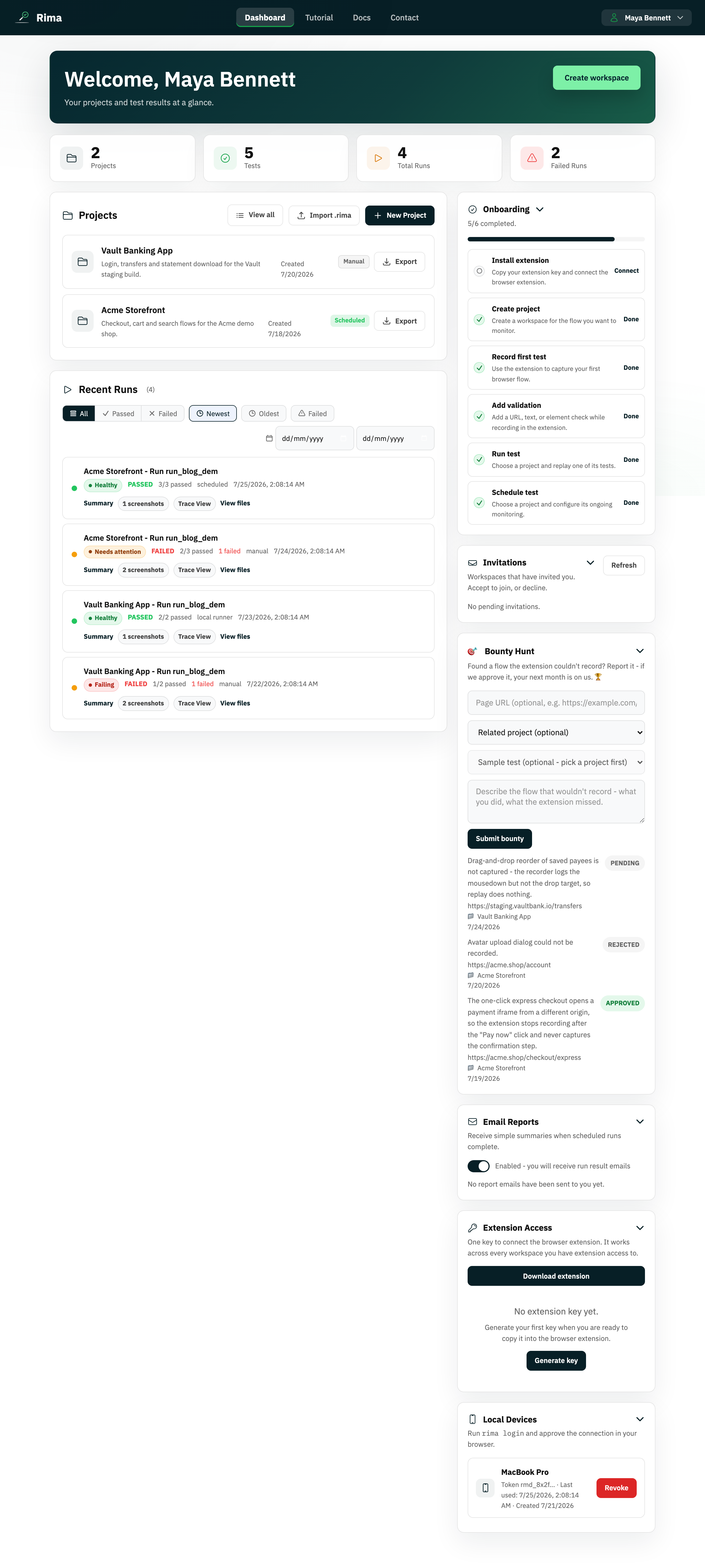
The dashboard is the main overview for the active workspace: project cards, recent runs, onboarding, invitations, tools, and account status.
What it is for
It provides a quick health check and shortcuts to the work you do most often.
How it works
- The dashboard loads the active workspace and shows metric cards for projects, tests, total runs, and failed runs.
- Panels cover projects, recent runs, onboarding, invitations, team members, email reports, bounty reports, extension access, and local devices.
- Most panels support search, filters, sorting, and pagination, and collapse when you click their header.
- A trial or billing banner appears when the workspace plan needs attention.
Example
After signing in, use the dashboard to see a failed overnight run, open its trace, rotate an extension key, and invite a teammate.
Common use cases
- See workspace statistics.
- Open or create a project.
- Review recent failures.
- Manage extension and local-device access.
Where to find it
Sign in and select Dashboard in the main navigation.
Limitations, requirements, and permissions
- Requires signing in with an active workspace; counts and actions cover only data you can access.
- Billing actions on the banner require owner or billing-management permission.
Related features and guides
Ready to try it yourself?
Create your free account, record your first flow, add a validation, and let Rima run it on a schedule for you.
Start free trial