Definition
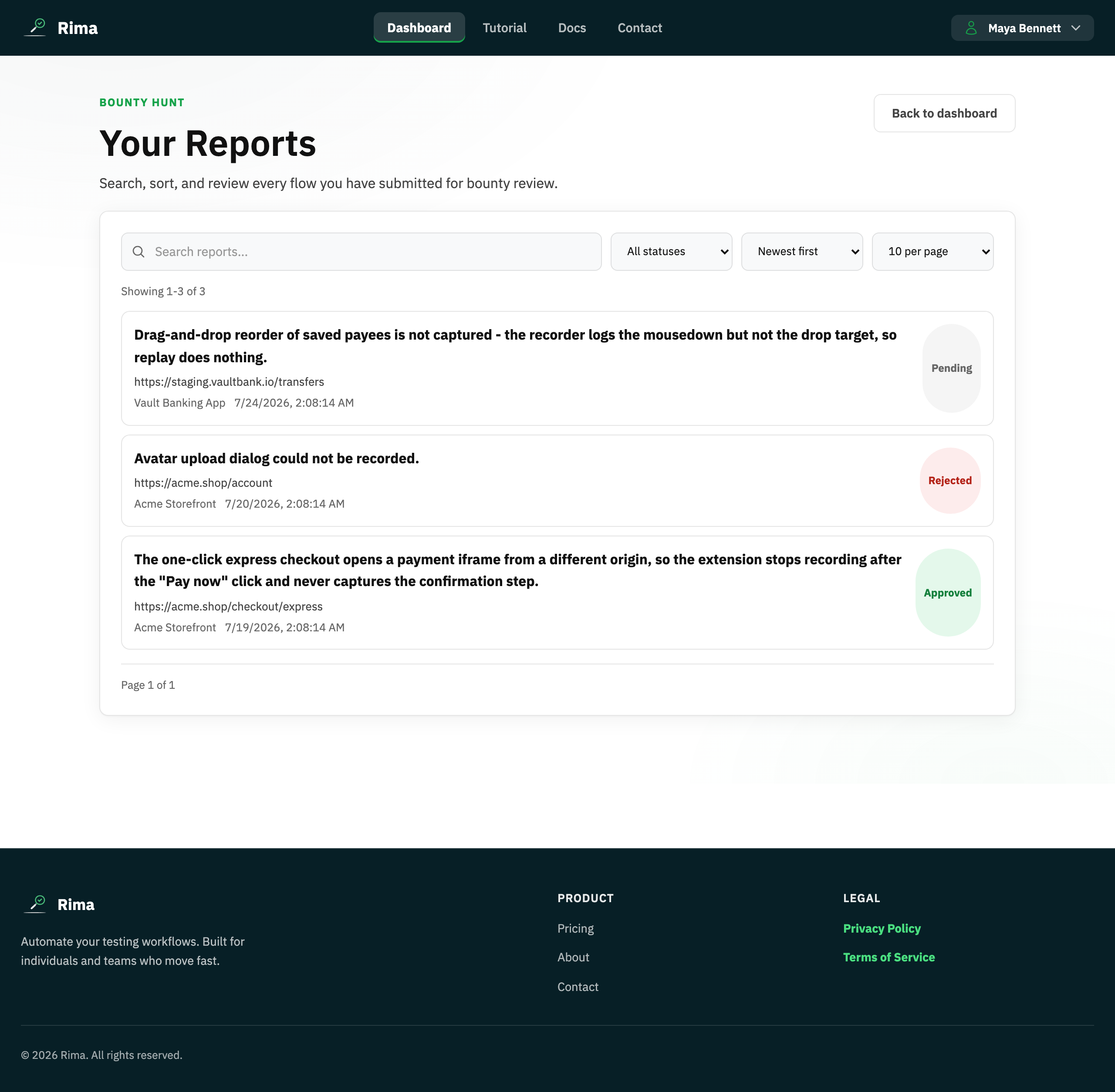
A bounty report describes a browser flow the recorder could not capture, optionally with a related project and sample test.
What it is for
It gives the Rima team a reproducible request for improving recorder coverage; approved reports may earn a reward.
How it works
- Describe the flow the recorder missed in the dashboard Bounty panel, optionally adding the page URL, a related project, and a sample saved test.
- The Rima team reviews each submission; reports move from pending to approved or rejected.
- Approved reports can earn a reward delivered through the reward flow.
- Track every submission and its status on the Bounty Reports page.
Example
Submit a report showing that a custom drag-and-drop component is not recorded, and attach the closest saved test.
Common use cases
- Report an unsupported interaction.
- Track review status.
- Provide a reproducible sample.
- Receive a reward for an approved case.
Where to find it
Submit from the dashboard Bounty panel and track all submissions on the Bounty Reports page.
Limitations, requirements, and permissions
- The description is required; the sample-test picker unlocks only after choosing a related project.
- Approval is decided by Rima administrators; rewards are not automatic.
- The dashboard preview shows only your five most recent reports.
Related features and guides
Ready to try it yourself?
Create your free account, record your first flow, add a validation, and let Rima run it on a schedule for you.
Start free trial