Definition
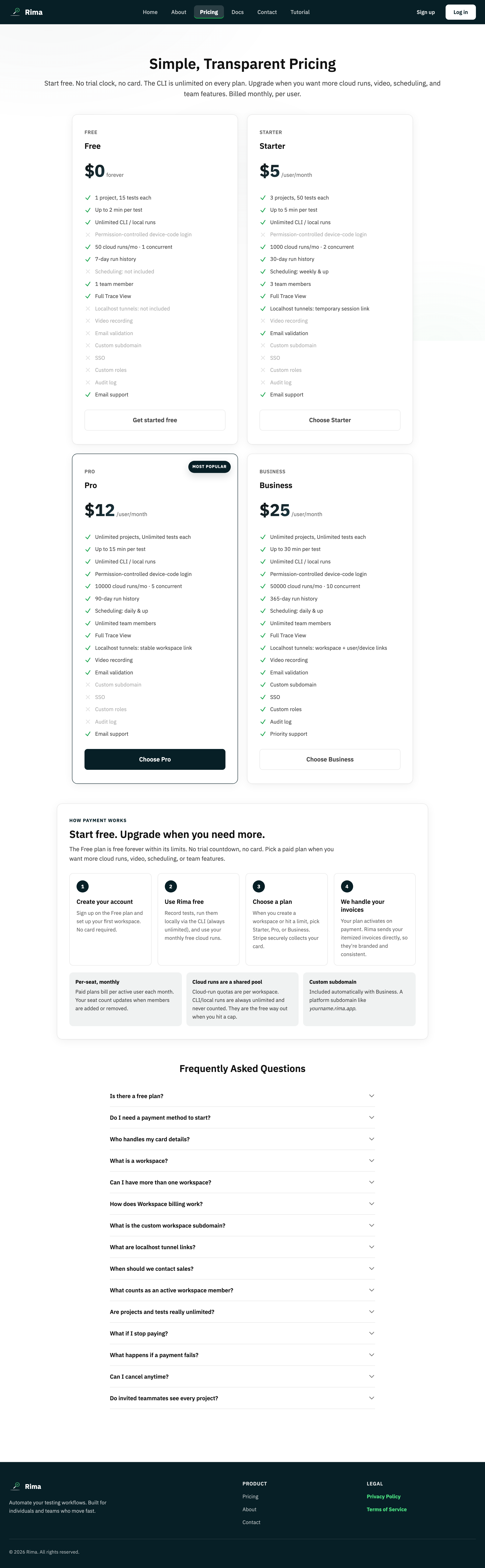
A plan defines workspace limits and features; a trial temporarily unlocks a paid plan; a subscription keeps it active through recurring billing.
What it is for
These states determine what the workspace can use and whether payment is currently required.
How it works
- Plans are Free, Starter, Pro, and Business; each sets the workspace’s limits and features.
- Creating a workspace on a paid plan starts a 14-day free trial with no card required.
- To keep a paid plan, subscribe through Stripe checkout; existing subscribers manage payment and plan through the Stripe customer portal.
- The dashboard banner reflects the current state: trial, active subscription, payment needed, or free plan.
Example
Create the first workspace on Pro, use the 14-day trial, then continue through Stripe checkout before the trial ends.
Common use cases
- Compare Free, Starter, Pro, and Business.
- Try paid features.
- Upgrade a workspace.
- Manage a recurring subscription.
Where to find it
Compare plans on Pricing, then use the dashboard trial banner or profile billing section to subscribe or manage the plan.
Limitations, requirements, and permissions
- Starting checkout or opening the billing portal requires owner or billing-management permission.
- When a trial ends without a subscription, paid features stop until you subscribe.
- The Free plan allows one active project at a time.
Related features and guides
Ready to try it yourself?
Create your free account, record your first flow, add a validation, and let Rima run it on a schedule for you.
Start free trial