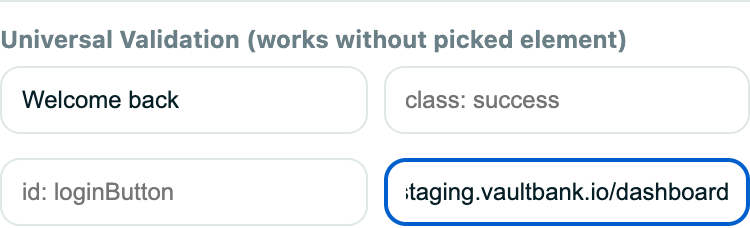
Definition
A validation is a condition that must be true for a test to pass, such as expected text, URL, element state, or email arrival.
What it is for
Actions prove the browser did something; validations prove the application produced the correct result.
How it works
- Each validation runs at its position in the step order and checks the live page (or the test inbox) against your expectation.
- Simple validations check page text or the URL; advanced validations target a selector and can require several properties at once.
- Email validations wait for a matching message sent to a generated test address.
- If any validation fails, the test fails, and the failure is captured in the run summary and trace with evidence.
Example
After submitting checkout, validate that the page contains “Order confirmed” and the URL contains /success.
Common use cases
- Confirm a page loaded.
- Verify saved data appears.
- Check an error message.
- Ensure an email was received.
Where to find it
Add validations after recording in the extension or insert/edit them from the test steps inside a project.
Limitations, requirements, and permissions
- A test with no validations only proves the actions completed, not that the result was correct.
- Email-based validations require a random-email step in the test.
- Adding or editing validations requires test-edit permission.
Related features and guides
Ready to try it yourself?
Create your free account, record your first flow, add a validation, and let Rima run it on a schedule for you.
Start free trial