Automation Testing Web Application
You know which flows hurt when they break. Signup. Login. Checkout. The screen your customers open every day.
You also know what happens when nobody checks them before a release. A customer emails you on Friday about a bug that shipped on Tuesday.
Automation testing web application flows is how you stop being the last to know. This guide covers what it is, the types worth knowing, how it works step by step, which tools to consider, and what to test first.
What is automation testing for a web application?
Automation testing web application flows means writing a user journey down once, then letting software repeat it for you.
A program opens a real browser. It clicks the buttons a person would click. It types into the same boxes. Then it checks that the right thing happened.
Here is a concrete example. A test opens your signup page and types a new email and password. It clicks Create account and waits for the dashboard. Then it checks that the words "Welcome back" appear. If any step fails, you get told.
That is the whole idea. The value is not in any single run. It is that the run happens again tomorrow, and next week, without anyone remembering to do it.
Worth being clear about one thing: this is not the same as monitoring. Monitoring tells you the site is up. A test tells you the site still works. A checkout page can return a healthy 200 response and still refuse every card.
What are the main types of web application testing?
These names overlap, and vendors use them loosely. Here is what each one actually means, and when you would reach for it.
Functional testing
Does this feature do what it is supposed to do? You check one piece of behaviour at a time. Example: the password reset email actually arrives and the link inside it works.
Regression testing
Did today's change break something that used to work? You run the same tests after each release. This is where most of the value sits, because the bugs that hurt most are the ones in features nobody touched.
End-to-end (E2E) testing
Does a whole journey work from start to finish? Not one button, but the full path: land on the pricing page, sign up, pay, reach the dashboard. Slower to run, and the closest thing to what a customer experiences.
Cross-browser testing
Does it work in Chrome, Firefox, and Safari? Layout and date handling still differ between engines. Useful, but do not start here. Fix Chrome first, since that is where most of your traffic is.
Visual testing
Does it still look right? The test compares screenshots against an approved version and flags what moved. Good at catching a broken layout that a functional test would happily pass through.
API testing
Does the backend return the right data? No browser involved, so it runs in seconds instead of minutes. Cheaper and faster than browser tests, and it catches a different class of bug. Most teams want both.
If you only do one, do regression testing on your money flows. Everything else is a refinement.
How does automated web application testing work?
Four steps, in the order that gets you a passing test fastest. You do not need a QA engineer, and depending on the tool you may not need to write code.
Describe the journey once
Either you write it in code, or you record it. Recording means installing a browser extension, pressing record, and clicking through the flow the way a customer would. Every click, keystroke, and page change is saved as a step.
Say what working looks like
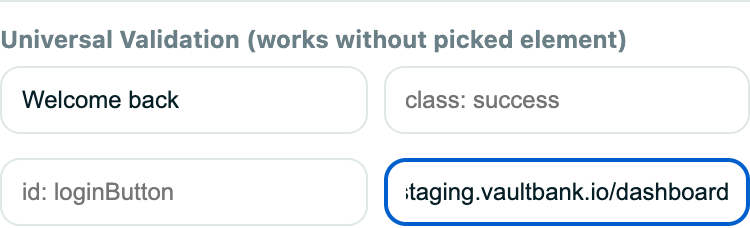
A script that only clicks proves very little. You add checks: this text shows up, this URL loads, this button exists. Testers call these assertions or validations. They are what turn a replay into a real test.
Run it somewhere repeatable
On your laptop, in CI after each deploy, or on a schedule in the cloud. Scheduling is the step people skip, and it is the one that does the work. A test you have to remember to run stops running by week three.
Read what came back
A pass count is not enough. You want the screenshot of the step that failed, ideally a video, and a trace you can step through. Without that evidence you spend an hour guessing at what a red X meant.
What should you automate first?
You will not test everything, and you should not try. Rank your flows by what they cost you when they break. Then work down that list until your afternoon runs out.
Anything that takes money
Checkout, upgrade, and billing. A broken payment step costs you revenue every hour it stays broken. That makes it the most valuable test you will ever record.
Anything that blocks the door
Signup, login, password reset, and invites. If these break, nobody gets in. And nobody who cannot get in will send you a helpful bug report.
The screen people live in
Whatever your users open daily. It changes the most, so it breaks the most.
The flow that broke last time
What broke once tends to break again. Record it before it does.
Which tool is best for web application automation testing?
There is no single best one. There is a best one for who is going to maintain the tests. Facts below are drawn from each project's own documentation and are current as of July 2026.
Playwright
Made by Microsoft and open source under Apache 2.0. You write tests as code in TypeScript, JavaScript, Python, Java, or .NET. Its codegen feature can record a starting point for you. Excellent traces and debugging. You run it on your own machines or CI, which means you provision and scale that yourself.
- Strength
- Reliability, debugging, and no licence cost
- Cost
- Engineering time, and infrastructure you own
Cypress
The test runner is open source and the developer experience is genuinely pleasant. Tests are JavaScript. Screenshots and video come built in, and Test Replay lives in the paid Cypress Cloud. Runs on your own machines or CI.
- Strength
- Fast feedback loop while writing tests
- Cost
- JavaScript required, and team features sit behind Cypress Cloud
Selenium
The oldest option, and the basis of the official WebDriver web standard. The widest language support and the largest ecosystem of third-party integrations. That maturity comes with more setup and more code for the same result.
- Strength
- Standards-based, works with almost everything
- Cost
- Most setup and the most code to maintain
No-code and low-code tools
You record the journey in a browser instead of writing it. Anyone on the team can add coverage, not only developers. Scheduling and reporting are usually built in. The trade is less fine control than hand-written code gives you, and you are on a hosted product rather than your own repo. Rima is in this group.
- Strength
- First test in minutes, and anyone can maintain it
- Cost
- Less control, and a subscription
Is Playwright better than Selenium?
For a new project in 2026, Playwright is usually the easier choice. It handles waiting for elements automatically, which removes the most common source of flaky tests. Its trace viewer is genuinely good. Setup is shorter.
Selenium is not obsolete, though. It is the basis of an official web standard, it supports more languages, and it plugs into more third-party services. If you already have a large Selenium suite and a team that knows it, rewriting it is rarely worth the money.
The honest summary: new project, pick Playwright. Existing Selenium suite that works, keep it and spend the time on coverage instead.
Can you automate web application testing without coding?
Yes. Recorders capture what you do in the browser and save it as a replayable test. The real question is not whether you can, but which approach survives in your team.
Pick code-based testing when
A developer will own the suite as part of their job. You want tests reviewed in pull requests next to the code they cover. You need unusual logic, like generating test data or talking to a database mid-test. Or you already have CI and someone who maintains it.
Pick no-code testing when
Nobody on the team has time to maintain a test repository. You want a non-developer to add coverage. You need results today rather than after a sprint of setup. Or the suite keeps dying because the one person who understood it moved on.
A useful test of your own situation: if a test broke tonight, who would fix it, and would they know how? If you cannot name that person, code-based testing will probably not last in your team, no matter how good the tool is.
How do you test localhost and private environments?
Environments catch most teams out. A cloud runner cannot see http://localhost:3000. It cannot see a staging site behind a VPN. So the feature you most want to check is the one it cannot reach.
There are two normal answers. Run the tests on your own machine, or open a secure tunnel so the cloud can reach your private URL. Both work. Check which one a tool supports before you commit, not after.
This is where an automation testing web application plan usually stalls. Rima handles it with a local runner: tests stay in the dashboard, but they run on your machine, against any URL it can reach. Recorded URLs are rewritten from your live site to your local one, so the same saved test works in both places.
What usually goes wrong, and what to do about it
Most abandoned test suites die from the same four things. None of them are hard to avoid once you know they are coming.
Flaky tests that fail at random
Usually a timing problem. The test clicks before the page finished loading. Modern tools wait for elements automatically, which fixes most of it. The rest is often a fixed wait of three seconds that should have been a wait for a specific element. Never ignore a flaky test. A suite people do not trust gets skipped, and a skipped suite is worth nothing.
Tests break every time the UI changes
Some of this is correct. A moved button is a change your customers see too. The rest is brittle targeting: a test tied to a generated class name will break when the styling changes. Prefer stable identifiers such as a test id or visible text. When a change was intentional, re-record the steps that broke instead of the whole journey.
The suite gets too slow to bother with
Clock time matters more than test count. Once a run takes longer than a coffee break, people stop waiting and start merging around it. Keep the scheduled browser suite to the journeys that would stop the business. Push everything else down to faster API and unit tests.
Nobody looks at the results
A dashboard nobody opens is not a safety net. Send failures where the team already is, whether that is email or a chat channel. And keep the signal clean, because if half the alerts are false alarms people will mute all of them within a fortnight.
Where Rima fits, honestly
Full disclosure: Rima is our product, and I built it. It is a record-and-replay tool in the no-code group above, running on Playwright underneath. You get Playwright's execution and its trace viewer without writing Playwright code. The tests it produces are standard Playwright scripts.
We built it for one situation we kept seeing. A small team knows it should have tests. Nobody is free to own a test repository. So recording happens in a browser extension. Scheduling is built in, with no CI needed. Screenshots, video, and traces are captured on every run without configuration.
It is the wrong tool if you want tests written as code and reviewed in pull requests, or a large real-device matrix. Playwright with a device cloud is a better answer there, and we say so on our comparison of end-to-end testing tools. The free plan is $0 with no card, so you can find out in an afternoon rather than a procurement cycle.
Questions people ask next
Is it safe to run automated tests against production?
For read-only journeys, yes. For anything that writes data, use a dedicated test account and expect real records to pile up: test orders, test signups, test emails. Many teams run read-only checks on production and keep write-heavy journeys on staging.
How do you test a flow that needs a real email or a login code?
You need a tool that can receive mail, not just send it. Rima gives each test a throwaway inbox, so a signup can wait for the verification email, check that it arrived, and click the link inside. Without that, email-gated flows are the first thing that stays manual forever.
Do automated browser tests work on mobile?
Browser tests can run against a mobile-sized viewport, which catches most responsive layout problems. That is different from testing on real devices, which needs a device cloud. And it is different again from testing a native iOS or Android app, which needs a different category of tool entirely.
Who owns the tests when there is no QA team?
Whoever shipped the change. In a small team, recorded tests hand over easily, because no framework knowledge sits locked in one person's head. Name an owner per journey, not per suite.
How much does automation testing usually cost?
Open source tools have no licence fee, but you pay in engineering time and the machines you run them on. Hosted tools charge per seat or per run and absorb that work instead. The honest comparison is total cost including the hours, not the sticker price, and the hours are the part teams forget to count.
Will this replace manual testing?
No, and any tool that claims otherwise is selling something. Automation covers the repetitive checks. Judgement about whether a feature is any good, and poking around to find bugs nobody thought to look for, stay human.
Record your first test today
Twenty minutes. No code, no CI setup, no card at signup. Start with the one flow you would hate to find broken.
Start free Read the docs